Bones Photoshop Stamp Brushes: Enhancing Your Creative Workflow
For designers, artists, and digital creators, the right tools can make all the difference in achieving professional results. Bones Photoshop Stamp Brushes offer a versatile solution that fits seamlessly into various stages of the creative process. Whether you're working on print media, web design, or personal projects, these brushes provide a unique way to add depth, texture, and visual interest to your work.
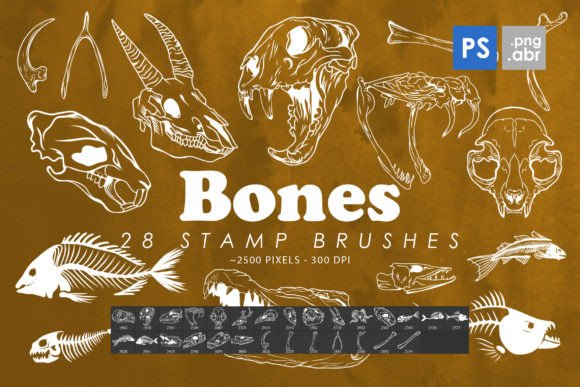
Designed for Photoshop CS6 through CC, this collection includes 28 high-quality stamp brushes and 28 isolated PNG images, each with a size range of 2000–2500 pixels. The combination of brush and PNG formats ensures flexibility, allowing you to use them as clipart, decorative elements, or base designs for tattoos, posters, and more.
Understanding the Role of Bones Photoshop Stamp Brushes in Design Workflows
Bones Photoshop Stamp Brushes are ideal for adding intricate details that would otherwise require hours of manual drawing. They serve as a time-saving resource that enhances efficiency without compromising quality. These brushes can be used during the early stages of a project to establish a foundation or added in later phases to refine and complete a design.
In a broader workflow, these brushes complement other design tools such as layer styles, gradients, and custom shapes. Their versatility makes them suitable for both digital painting and graphic design tasks. By integrating them into your existing toolkit, you can streamline your creative process and achieve consistent results across different projects.
Practical Use Cases for Bones Photoshop Stamp Brushes
One of the most effective ways to use Bones Photoshop Stamp Brushes is as a base for custom illustrations. For example, if you're creating a tattoo design, you can start by applying a bone brush to outline the structure, then fill in the details with other tools. This approach not only saves time but also ensures a cohesive look.
These brushes are also useful for enhancing textures in background elements. When designing a poster or card, you can overlay a bone pattern to add visual complexity. The PNG files allow for easy placement and scaling, making them ideal for use in web layouts or social media graphics.
Another practical application is in the creation of editorial content. Photographers and editors often use stamp brushes to add subtle patterns or motifs to images. Bones Photoshop Stamp Brushes can help create a vintage or artistic feel, depending on how they're applied and combined with other effects.
Integration with Other Tools and Resources
To get the most out of Bones Photoshop Stamp Brushes, it's important to consider how they interact with other resources. For instance, pairing them with custom brushes or stock images can expand your creative options. You might combine a bone brush with a grunge texture to create a weathered look, or use it alongside vector graphics for a mixed-media effect.
When working with clients or collaborators, these brushes can serve as a reference point for visual direction. Sharing a sample design that incorporates bones brushes can help communicate your vision more effectively. This is especially useful in branding or packaging projects where consistency is key.
Additionally, Bones Photoshop Stamp Brushes can be part of a larger asset library. Organizing them alongside other brushes, textures, and fonts helps maintain a structured workflow. This practice ensures that you can quickly access the right tool for the job, improving overall productivity.
Workflow Tips for Maximizing Efficiency
Before using Bones Photoshop Stamp Brushes, take time to plan your design. Consider the scale, placement, and color scheme to ensure the brushes enhance rather than overwhelm your composition. Testing different brush settings, such as opacity and flow, can help achieve the desired effect without overcomplicating the image.
For optimal performance, make sure your Photoshop version is up to date. Compatibility issues can affect how the brushes render, so checking system requirements is essential. If you're working on a large project, saving multiple versions of your file can prevent data loss and allow for easy revisions.
When using the PNG files, consider adjusting their transparency and layer blending modes to integrate them smoothly with your design. Experimenting with layer masks and adjustment layers can further refine the final output, ensuring a polished result.
Long-Term Benefits of Using Bones Photoshop Stamp Brushes
Investing in a high-quality brush set like Bones Photoshop Stamp Brushes offers long-term value. As your skills develop, you'll find new and innovative ways to apply these tools, expanding your creative repertoire. The ability to reuse and repurpose the brushes across different projects makes them a valuable addition to any designer's toolkit.
Moreover, these brushes contribute to a consistent visual style, which is crucial for branding and marketing materials. By maintaining a cohesive look across various platforms, you reinforce your brand identity and build recognition among your audience.
Finally, using Bones Photoshop Stamp Brushes encourages experimentation and creativity. Whether you're working on a personal project or a client assignment, these tools provide the flexibility to explore new ideas and push the boundaries of your design work.
Conclusion: A Valuable Addition to Your Creative Process
Bones Photoshop Stamp Brushes are more than just a collection of digital assets—they are a practical solution that enhances efficiency, creativity, and consistency in design workflows. By understanding how to integrate them into your process, you can unlock new possibilities and elevate the quality of your work.
Whether you're a seasoned designer or just starting out, these brushes offer a flexible and reliable way to add unique elements to your projects. With proper planning, organization, and experimentation, they can become an essential part of your creative arsenal, helping you achieve professional results with ease.