Gears Photoshop Stamp Brushes: A Creative Tool for Designers and Artists
If you're looking to add intricate, mechanical details to your digital artwork, Gears Photoshop Stamp Brushes can be a game-changer. These brushes are designed to bring the essence of gears into your designs, offering a unique way to enhance visual elements with precision and style. Whether you're a professional designer or an enthusiast, these tools can elevate your creative output significantly.
What Are Gears Photoshop Stamp Brushes?
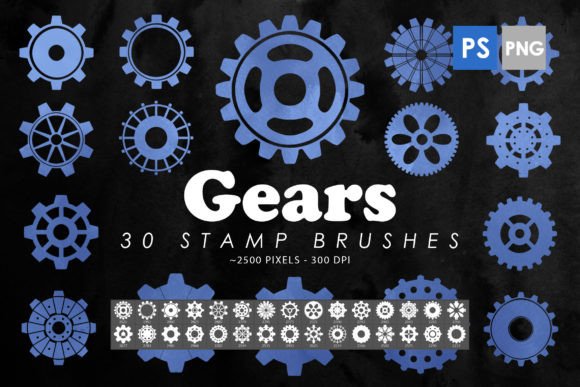
Gears Photoshop Stamp Brushes are a collection of high-quality brush sets that mimic the look and feel of real gears. Each brush is crafted with attention to detail, ensuring that when you apply it to your canvas, it looks authentic and professional. The set typically includes 30 different brushes, each with varying sizes and styles, allowing for versatility in design applications.
These brushes come in the form of ABR files, which are compatible with Adobe Photoshop CS6 through CC. They also include isolated PNG images, giving you the flexibility to use them as clipart or decorative elements in various projects. The size range of the brushes usually falls between 2000 to 2500 pixels, making them suitable for both large-scale and detailed work.
Key Features and Benefits
The Gears Photoshop Stamp Brushes offer several features that make them stand out. One of the main advantages is their high-resolution quality, which ensures that your designs remain sharp and clear even when scaled up. This makes them ideal for print projects, where clarity is essential.
Another benefit is the variety of gear styles included in the set. From simple cogs to complex, multi-layered mechanisms, there's something for every design need. This diversity allows users to experiment with different aesthetics, helping them find the perfect fit for their project.
Additionally, the brushes are easy to use. Once installed in Photoshop, they can be applied with just a few clicks. This simplicity makes them accessible to users of all skill levels, from beginners to seasoned professionals.
Applications and Use Cases
The versatility of Gears Photoshop Stamp Brushes means they can be used in a wide range of applications. For instance, if you're creating a poster or a banner for a tech-related event, adding gears can give your design a futuristic and industrial feel. Similarly, if you're working on a logo or branding material, gears can add a sense of strength and precision.
These brushes are also popular among tattoo artists who use them as a base for custom designs. By incorporating gears into their work, artists can create unique and meaningful pieces that resonate with clients who appreciate mechanical aesthetics.
In the realm of web design, gears can serve as decorative elements that add depth and interest to a website’s layout. They can be used as background textures, icons, or even part of a larger graphic element, enhancing the overall user experience.
Who Can Benefit from Gears Photoshop Stamp Brushes?
Designers, illustrators, and artists who specialize in mechanical or industrial themes will find Gears Photoshop Stamp Brushes particularly useful. However, the tools are not limited to this niche. Anyone looking to add a touch of complexity and detail to their work can benefit from using these brushes.
Business owners who need to create marketing materials, such as brochures or social media graphics, can also leverage the power of these brushes. They provide a quick and effective way to enhance visuals without requiring advanced design skills.
For students or hobbyists exploring digital art, Gears Photoshop Stamp Brushes offer an excellent opportunity to experiment with different styles and techniques. They can serve as a learning tool, helping users understand how to incorporate mechanical elements into their work.
Strengths and Considerations
One of the greatest strengths of Gears Photoshop Stamp Brushes is their ability to add a unique aesthetic to any project. Their detailed design and high resolution make them a valuable asset for anyone looking to create visually striking content. Additionally, the inclusion of PNG files provides extra flexibility, allowing users to integrate the brushes into other design software or platforms.
However, it's important to consider the limitations of these brushes. While they are highly versatile, they may not be suitable for every project. For example, if you're aiming for a minimalist or abstract design, gears might not align with your vision. It's crucial to evaluate whether the style of the brushes matches the overall theme of your work.
Another consideration is the compatibility of the brushes with different versions of Photoshop. While most modern versions support ABR files, it's always a good idea to check the system requirements before purchasing or downloading the set.
Real-World Examples and Scenarios
Imagine you're designing a promotional poster for a science fiction movie. Incorporating Gears Photoshop Stamp Brushes can help you create a background that reflects the film's futuristic setting. The intricate details of the gears can add depth and texture, making the poster more engaging and visually appealing.
Or consider a scenario where you're working on a business card for a mechanical engineering firm. Using gears as a design element can reinforce the company's identity and convey a sense of professionalism and expertise. The brushes allow you to achieve this effect quickly and efficiently.
Another example could be a digital illustration for a children's book. Adding subtle gear elements can introduce a playful and imaginative aspect to the story, capturing the attention of young readers while maintaining a clean and cohesive look.
Evaluating Suitability for Your Projects
When considering whether Gears Photoshop Stamp Brushes are right for your needs, start by identifying the purpose of your project. Ask yourself: What kind of visual elements do I want to include? Do I need something that adds complexity or a specific theme?
It's also helpful to look at examples of how others have used these brushes. This can provide insight into the possibilities and help you visualize how they might fit into your own work. Experimenting with the brushes in a test project can also be a great way to assess their effectiveness and suitability.
Ultimately, the value of Gears Photoshop Stamp Brushes lies in their ability to enhance your creative process. Whether you're working on a personal project or a professional assignment, these tools can provide the detail and style you need to make your designs stand out.